
🚀 XRCL V2.5 Launch — XR Creator Studio + AI Superpowers
We're excited to introduce XR Community Library v2.5: The Creator Revolution. This major update brings the full-featured XR Creator Studio — an AI-powered development environment that lets anyone build immersive XR experiences from scratch, right in their browser. No downloading a game engine — it all happens in the browser. Just you and an intelligent AI assistant that builds WebXR worlds with you.
Here's everything new and improved 👇
🚀 XRCL V2.5 Launch — XR Creator Studio + AI Superpowers
We're excited to introduce XR Community Library v2.5: The Creator Revolution. This major update brings the full-featured XR Creator Studio — an AI-powered development environment that lets anyone build immersive XR experiences from scratch, right in their browser. No downloading a game engine — it all happens in the browser. Just you and an intelligent AI assistant that builds WebXR worlds with you.
Here's everything new and improved 👇
🆕 What's New
🎨 XR Creator Studio — The AI-Powered XR IDE
https://xrcommunitylibrary.app/xr-creator-studio
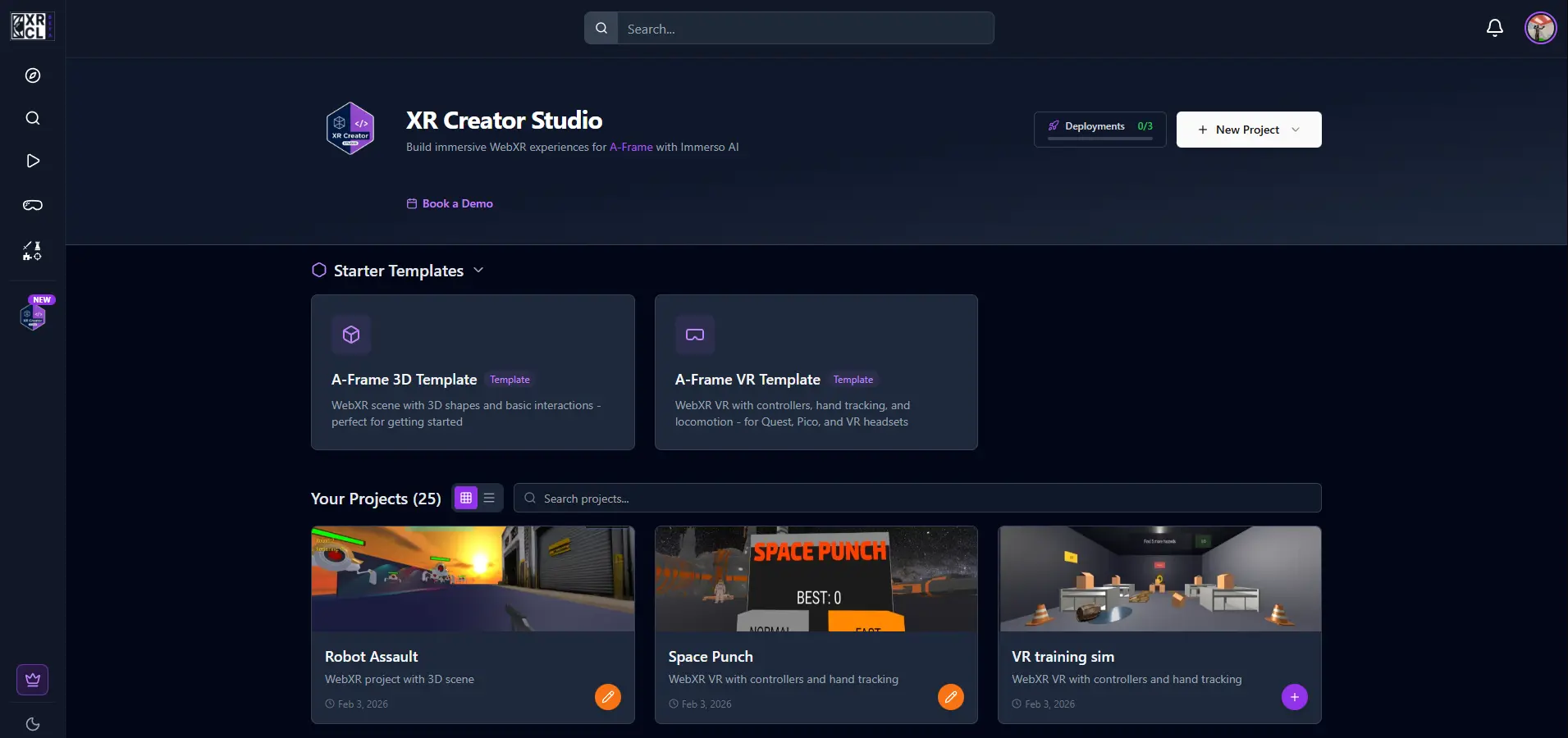
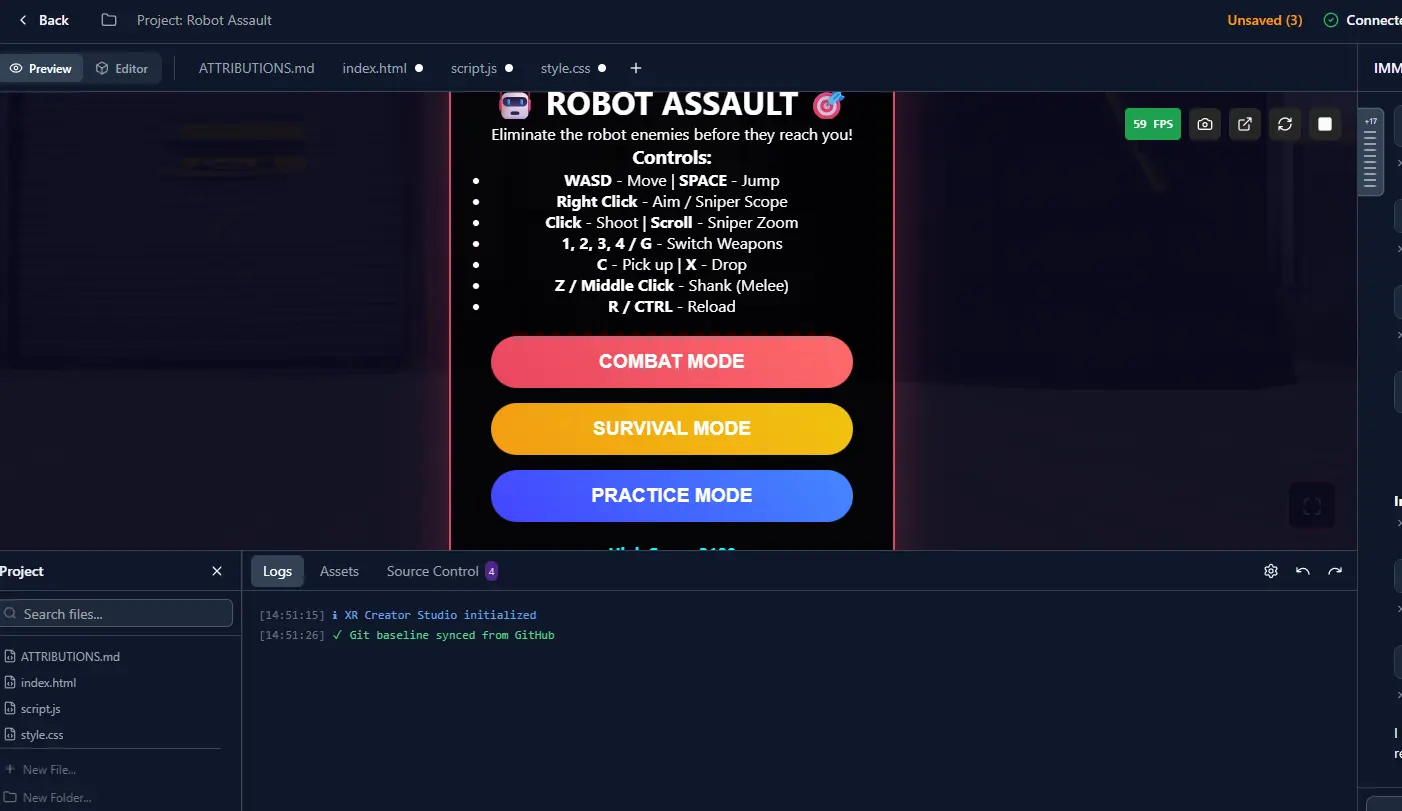
The centerpiece of v2.5 is the XR Creator Studio — a complete browser-based development environment for building A-Frame WebXR experiences. Think "Cursor for XR" or "Replit meets VR."
🆕 What's New
🎨 XR Creator Studio — The AI-Powered XR IDE
https://xrcommunitylibrary.app/xr-creator-studio
The centerpiece of v2.5 is the XR Creator Studio — a complete browser-based development environment for building A-Frame WebXR experiences. Think "Cursor for XR" or "Replit meets VR."
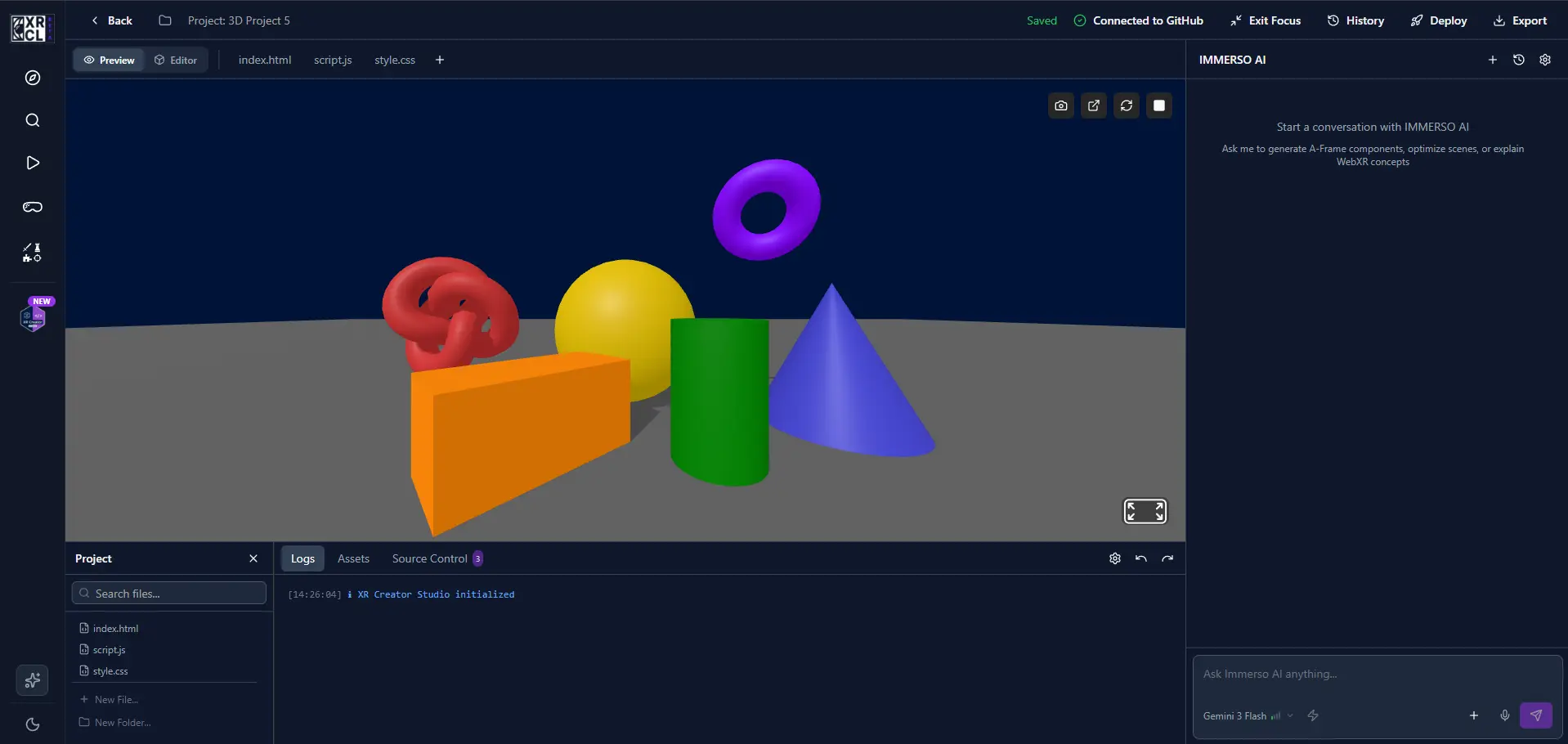
✨ AI Chat Assistant (Immerso AI)
- Conversational XR Development — Describe what you want to build, and the AI writes the code
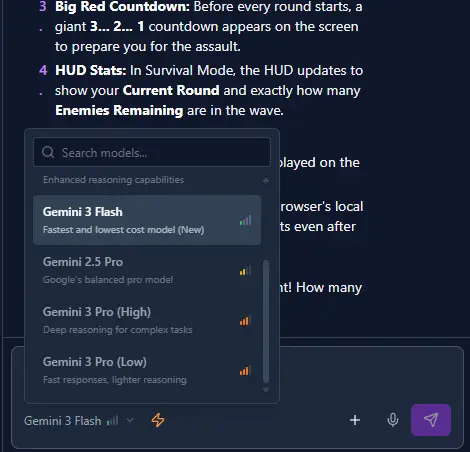
- Multi-Model Intelligence — Choose from multiple AI models including Gemini 3 Pro, DeepSeek-V3.2, Qwen3-Coder, Kimi-K2-Thinking, and more
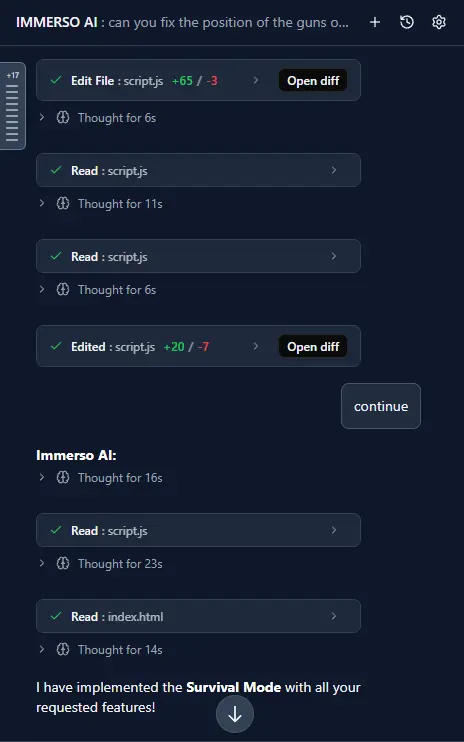
- Tool-Enabled AI — The AI can search the web, find 3D models, download assets, read documentation, and more — automatically
- Thinking Mode — See the AI's reasoning process with expandable thinking dropdowns
- Image Understanding — Paste or upload images for the AI to analyze and incorporate
- Conversation History — Access all your past conversations and continue where you left off
✨ AI Chat Assistant (Immerso AI)
- Conversational XR Development — Describe what you want to build, and the AI writes the code
- Multi-Model Intelligence — Choose from multiple AI models including Gemini 3 Pro, DeepSeek-V3.2, Qwen3-Coder, Kimi-K2-Thinking, and more
- Tool-Enabled AI — The AI can search the web, find 3D models, download assets, read documentation, and more — automatically
- Thinking Mode — See the AI's reasoning process with expandable thinking dropdowns
- Image Understanding — Paste or upload images for the AI to analyze and incorporate
- Conversation History — Access all your past conversations and continue where you left off
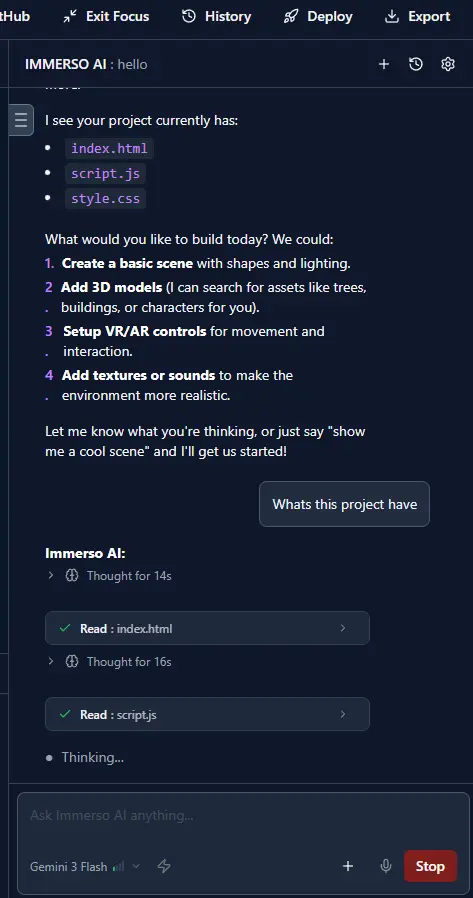
🖼️ Visual Scene Editor
- 3D Gizmo Controls — Translate, rotate, and scale entities with intuitive visual handles
- Scene Hierarchy Panel — View and manage all entities in a tree structure
- Inspector Panel — Edit entity properties, transforms, materials, and components
- Two-Way Binding — Changes in the visual editor instantly update the source code and vice versa
- Entity Management — Add, duplicate, rename, and delete entities with full undo/redo support
- Drag & Drop Reordering — Reorganize scene hierarchy with drag-and-drop
- Immersive Fullscreen Mode — Maximize your editing canvas for distraction-free creation
🖼️ Visual Scene Editor
- 3D Gizmo Controls — Translate, rotate, and scale entities with intuitive visual handles
- Scene Hierarchy Panel — View and manage all entities in a tree structure
- Inspector Panel — Edit entity properties, transforms, materials, and components
- Two-Way Binding — Changes in the visual editor instantly update the source code and vice versa
- Entity Management — Add, duplicate, rename, and delete entities with full undo/redo support
- Drag & Drop Reordering — Reorganize scene hierarchy with drag-and-drop
- Immersive Fullscreen Mode — Maximize your editing canvas for distraction-free creation
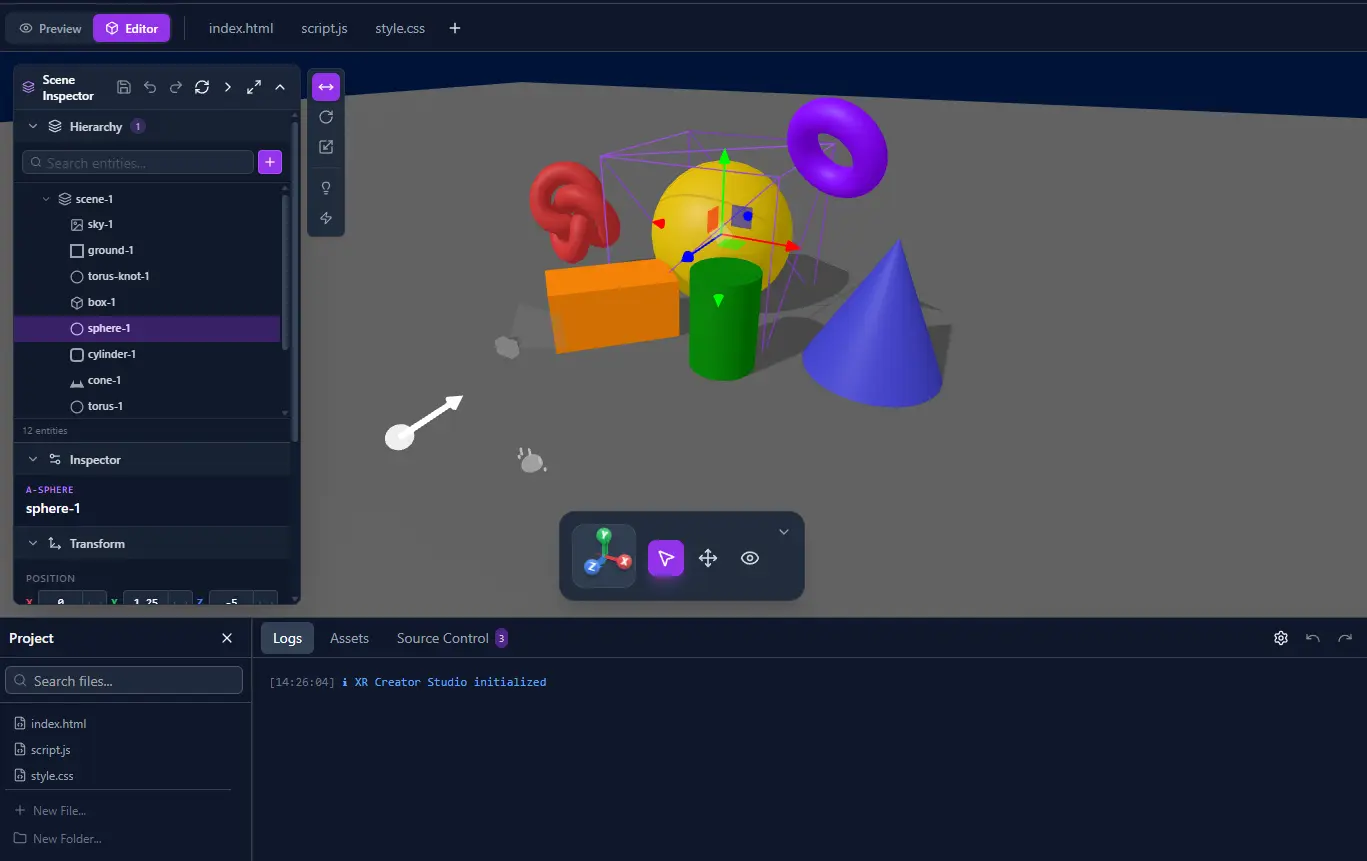
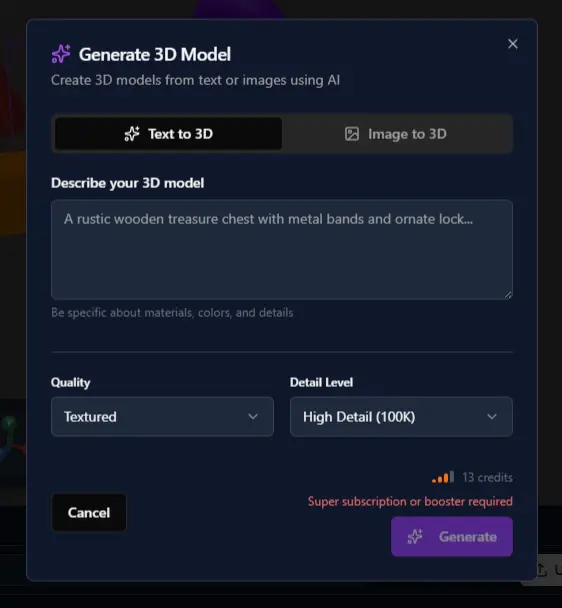
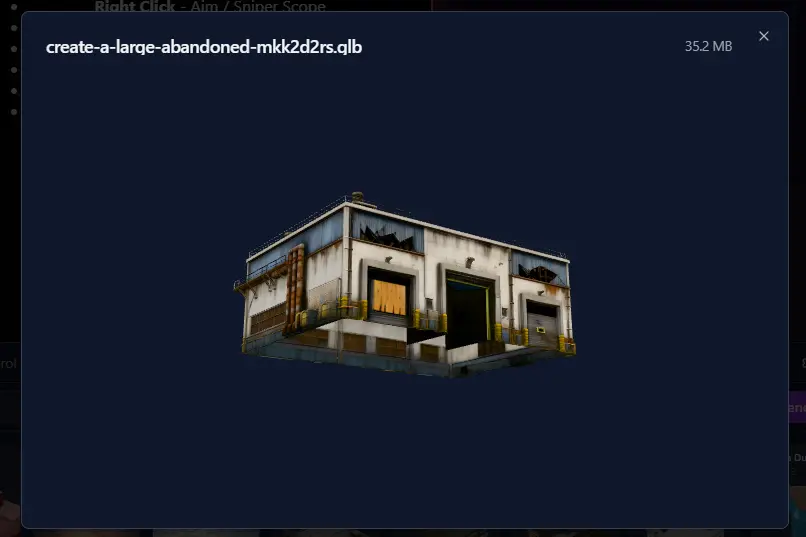
🤖 AI-Powered Asset Generation
- 3D Model Generation — Generate 3D models from text prompts or images
- Text-to-3D — Describe what you want: "A low-poly sword with a blue gem" → 3D model
- Image-to-3D — Upload a reference image and generate a matching 3D model
- Live 3D Preview — Preview generated models before adding to your scene
🤖 AI-Powered Asset Generation
- 3D Model Generation — Generate 3D models from text prompts or images
- Text-to-3D — Describe what you want: "A low-poly sword with a blue gem" → 3D model
- Image-to-3D — Upload a reference image and generate a matching 3D model
- Live 3D Preview — Preview generated models before adding to your scene
💾 Project Management
- Auto-Save — Never lose work with automatic saving
- Version History — View and restore previous versions of your project
- File Management — Create, rename, delete files and folders
- Multi-file Projects — Work with complex projects containing multiple HTML, CSS, JS, and asset files
- Asset Panel — Upload, manage, and organize your project assets (3D models, images, audio)
💾 Project Management
- Auto-Save — Never lose work with automatic saving
- Version History — View and restore previous versions of your project
- File Management — Create, rename, delete files and folders
- Multi-file Projects — Work with complex projects containing multiple HTML, CSS, JS, and asset files
- Asset Panel — Upload, manage, and organize your project assets (3D models, images, audio)
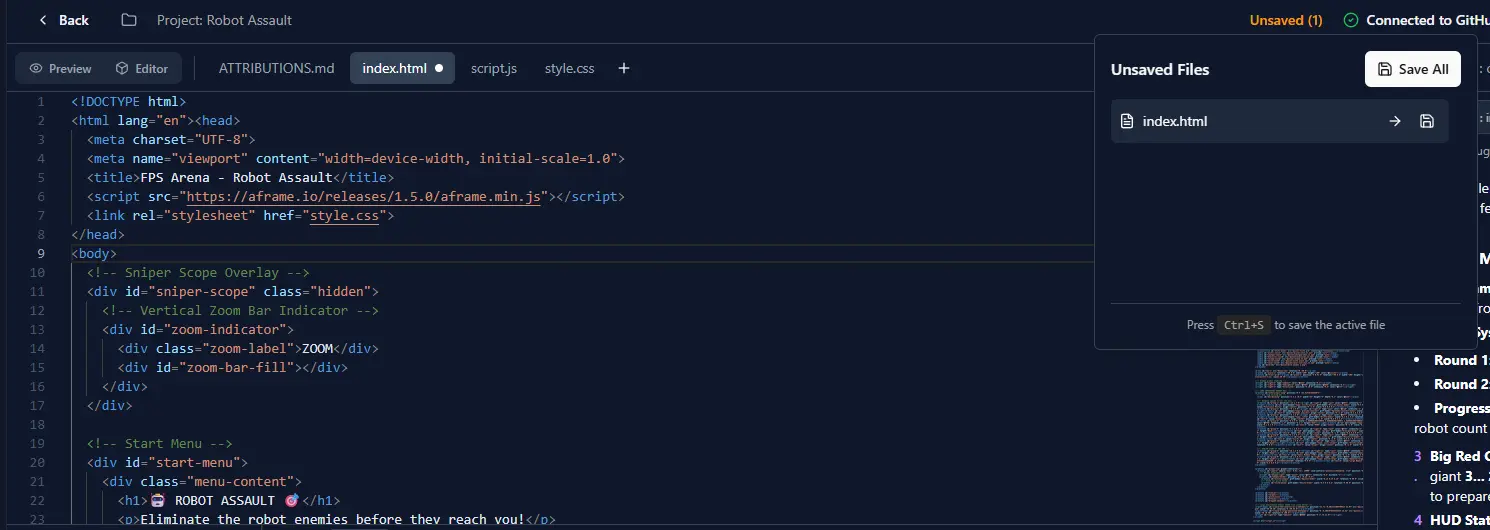
🌐 Deployment & Sharing
- One-Click Deploy — Publish your XR experience to a live URL with one click (powered by Netlify)
- Shareable Links — Get a permanent URL to share your creation with anyone
- Meta Quest 3 Ready — Deploy to HTTPS and test directly on Quest 3
🌐 Deployment & Sharing
- One-Click Deploy — Publish your XR experience to a live URL with one click (powered by Netlify)
- Shareable Links — Get a permanent URL to share your creation with anyone
- Meta Quest 3 Ready — Deploy to HTTPS and test directly on Quest 3
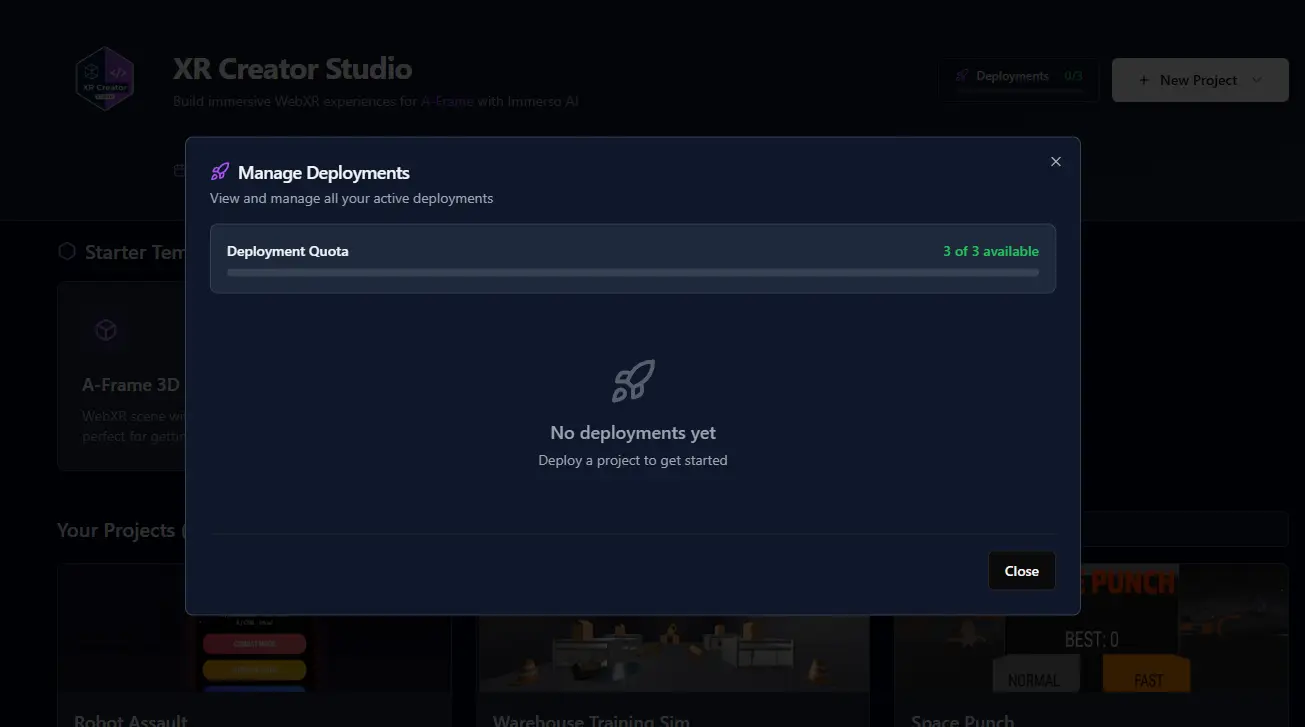
🔗 GitHub Integration
- Connect Repository — Link your project to a GitHub repo
- Push/Pull Changes — Sync changes with your remote repository
- Branch Management — Create, switch, and manage branches
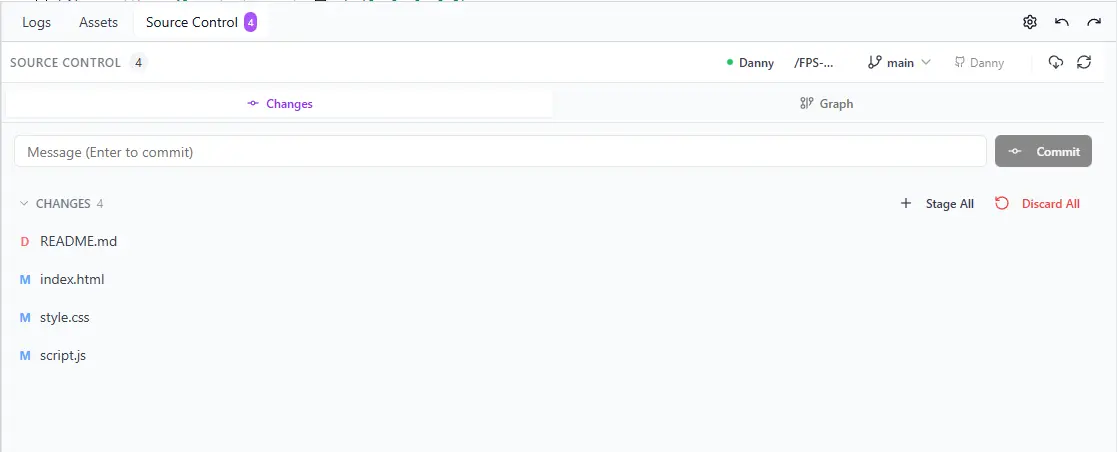
- Source Control Panel — Visual diff, stage changes, and commit messages
🔗 GitHub Integration
- Connect Repository — Link your project to a GitHub repo
- Push/Pull Changes — Sync changes with your remote repository
- Branch Management — Create, switch, and manage branches
- Source Control Panel — Visual diff, stage changes, and commit messages
🤖 AI Generation for XR Libraries & Experiences
AI-Assisted Content Creation Across the Platform
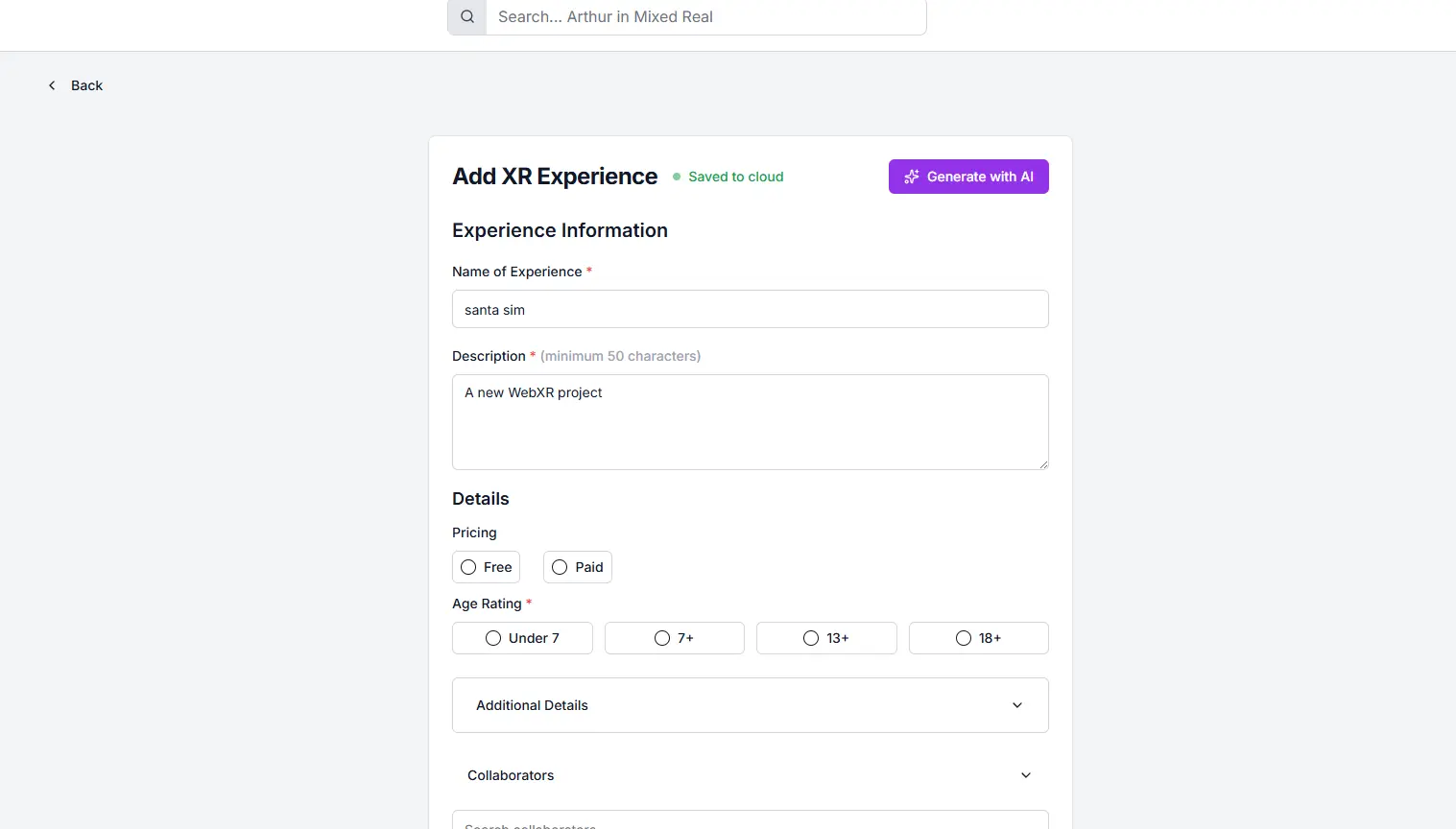
Not just in the Creator Studio — AI generation is now available when adding content to the XR Community Library:
- Generate Thumbnails — Create eye-catching thumbnails with AI when adding new XR Experiences
- Generate Cover Images — AI-powered cover images for your XR Libraries
- Smart Descriptions — Get AI assistance writing compelling descriptions for your content
Whether you're submitting a new experience or creating a curated library, AI helps you present your content beautifully.
🤖 AI Generation for XR Libraries & Experiences
AI-Assisted Content Creation Across the Platform
Not just in the Creator Studio — AI generation is now available when adding content to the XR Community Library:
- Generate Thumbnails — Create eye-catching thumbnails with AI when adding new XR Experiences
- Generate Cover Images — AI-powered cover images for your XR Libraries
- Smart Descriptions — Get AI assistance writing compelling descriptions for your content
Whether you're submitting a new experience or creating a curated library, AI helps you present your content beautifully.
💳 AI Credits & Usage System
Smart Pricing That Makes Sense
We've built a transparent usage system that gives everyone access to powerful AI:
Free Tier ($0/month)
- 10 messages per day
- 150 monthly AI credits
- Access to Light (🟢) models: DeepSeek-V3.2, Qwen3-Coder, GPT-OSS-120B, Kimi-K2-Thinking
Super Tier ($30/month)
- 75 messages per day
- 2,000+ monthly AI credits
- Access to ALL models including Moderate (🟡), Heavy (🟠), and Peak (🔴) tiers
- Light Fallback — When premium runs out, keep using Light models
Super Boosters ($6 each or 3 for $15)
- 75 extra AI credits for 24 hours
- Access to all models (great for intense building sessions!)
- Available to both Free and Super users
Usage Tiers (What You See)
| Tier | Color | What You Get |
|---|---|---|
| 🟢 Light | Green | Budget models, many messages |
| 🟡 Moderate | Yellow | Balanced models like Gemini 2.5 Pro |
| 🟠 Heavy | Orange | Premium models like Gemini 3 Pro |
| 🔴 Peak | Red | Top-tier premium models |
💳 AI Credits & Usage System
Smart Pricing That Makes Sense
We've built a transparent usage system that gives everyone access to powerful AI:
Free Tier ($0/month)
- 10 messages per day
- 150 monthly AI credits
- Access to Light (🟢) models: DeepSeek-V3.2, Qwen3-Coder, GPT-OSS-120B, Kimi-K2-Thinking
Super Tier ($30/month)
- 75 messages per day
- 2,000+ monthly AI credits
- Access to ALL models including Moderate (🟡), Heavy (🟠), and Peak (🔴) tiers
- Light Fallback — When premium runs out, keep using Light models
Super Boosters ($6 each or 3 for $15)
- 75 extra AI credits for 24 hours
- Access to all models (great for intense building sessions!)
- Available to both Free and Super users
Usage Tiers (What You See)
| Tier | Color | What You Get |
|---|---|---|
| 🟢 Light | Green | Budget models, many messages |
| 🟡 Moderate | Yellow | Balanced models like Gemini 2.5 Pro |
| 🟠 Heavy | Orange | Premium models like Gemini 3 Pro |
| 🔴 Peak | Red | Top-tier premium models |
🛠️ AI Tools & Capabilities
Immerso AI isn't just a chatbot — it can take action:
| Tool | What It Does |
|---|---|
search_web |
Search tutorials, documentation, and solutions |
search_3d_assets |
Find 3D models from Poly Pizza (CC0 licensed) |
search_audio_assets |
Find sound effects from Freesound |
search_textures |
Find PBR textures from Poly Haven |
download_asset |
Download assets directly into your project |
read_url_content |
Read any webpage or documentation |
list_aframe_components |
Know what A-Frame components are available |
Automatic Attribution — All downloaded assets get proper attribution tracked in an auto-generated ATTRIBUTIONS.md file.
🛠️ AI Tools & Capabilities
Immerso AI isn't just a chatbot — it can take action:
| Tool | What It Does |
|---|---|
search_web |
Search tutorials, documentation, and solutions |
search_3d_assets |
Find 3D models from Poly Pizza (CC0 licensed) |
search_audio_assets |
Find sound effects from Freesound |
search_textures |
Find PBR textures from Poly Haven |
download_asset |
Download assets directly into your project |
read_url_content |
Read any webpage or documentation |
list_aframe_components |
Know what A-Frame components are available |
Automatic Attribution — All downloaded assets get proper attribution tracked in an auto-generated ATTRIBUTIONS.md file.
🎨 Experience & UI Enhancements
- Improved Dark/Light Mode — Consistent theming across all components
- Code Editor — VSCode-quality code editing experience
- Syntax Highlighting — For HTML, CSS, JavaScript, plus Markdown file preview
- Live Preview Panel — See your A-Frame scene update in real-time
- Responsive Panels — Resize and arrange panels to your workflow
- Log Output — See logs and debugging info without opening browser DevTools
🎨 Experience & UI Enhancements
- Improved Dark/Light Mode — Consistent theming across all components
- Code Editor — VSCode-quality code editing experience
- Syntax Highlighting — For HTML, CSS, JavaScript, plus Markdown file preview
- Live Preview Panel — See your A-Frame scene update in real-time
- Responsive Panels — Resize and arrange panels to your workflow
- Log Output — See logs and debugging info without opening browser DevTools
🧩 For Creators
| What You Can Do | How |
|---|---|
| Build XR from scratch | Start a new project and chat with the AI to build your scene |
| Import existing projects | Upload your A-Frame HTML and continue developing |
| Generate 3D assets | Use AI to create custom 3D models from text or images |
| Deploy to the world | One-click deploy to get a shareable URL (powered by Netlify) |
| Collaborate with GitHub | Connect repos and push/pull changes |
| Test on Quest 3 | Deploy to HTTPS for testing on VR headsets |
🧩 For Creators
| What You Can Do | How |
|---|---|
| Build XR from scratch | Start a new project and chat with the AI to build your scene |
| Import existing projects | Upload your A-Frame HTML and continue developing |
| Generate 3D assets | Use AI to create custom 3D models from text or images |
| Deploy to the world | One-click deploy to get a shareable URL (powered by Netlify) |
| Collaborate with GitHub | Connect repos and push/pull changes |
| Test on Quest 3 | Deploy to HTTPS for testing on VR headsets |
🤝 Join the XRCL Community
Have feedback or want to showcase your latest creation?
Join our Discord: https://discord.com/invite/32WuyUmzFd
Connect with other XR creators, share your projects, and help shape the future of XR Creator Studio.
👏 Thank You
From v1 to v2 to v2.5 — every release has been shaped by your feedback and creativity. The XR Creator Studio represents our biggest leap yet: a vision where anyone can build immersive XR experiences, powered by AI that understands 3D, WebXR, and A-Frame.
Whether you're an experienced developer looking for a faster workflow, or someone who's never written a line of code, XR Creator Studio is built for you.
Start Building: https://xrcommunitylibrary.app/xr-creator-studio
Danny Tapia
Creator, XR Community Library
in Dimensions: XRCL Change Log
🤝 Join the XRCL Community
Have feedback or want to showcase your latest creation?
Join our Discord: https://discord.com/invite/32WuyUmzFd
Connect with other XR creators, share your projects, and help shape the future of XR Creator Studio.
👏 Thank You
From v1 to v2 to v2.5 — every release has been shaped by your feedback and creativity. The XR Creator Studio represents our biggest leap yet: a vision where anyone can build immersive XR experiences, powered by AI that understands 3D, WebXR, and A-Frame.
Whether you're an experienced developer looking for a faster workflow, or someone who's never written a line of code, XR Creator Studio is built for you.
Start Building: https://xrcommunitylibrary.app/xr-creator-studio
Danny Tapia
Creator, XR Community Library
in Dimensions: XRCL Change Log